Code
#install.packages("tidyr")
#install.packages("dplyr") # in case you use pipe '%>%' Exercise time: 45 minutes
Questions
Objectives
tidyr.Researchers often want to reshape their data frames from ‘wide’ to ‘longer’ layouts, or vice-versa. The ‘long’ layout or format is where:
In the purely ‘long’ (or ‘longest’) format, you usually have 1 column for the observed variable and the other columns are ID variables.
For the ‘wide’ format each row is often a site/subject/patient and you have multiple observation variables containing the same type of data. These can be either repeated observations over time, or observation of multiple variables (or a mix of both). You may find data input may be simpler or some other applications may prefer the ‘wide’ format.
However, many of
R‘s functions have been designed assuming you have ’longer’ formatted data.
This tutorial will help you efficiently transform your data shape regardless of original format.
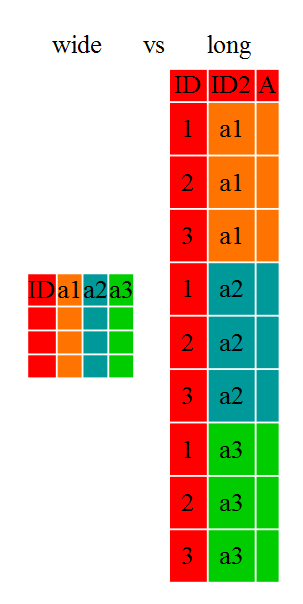
Long and wide data frame layouts mainly affect readability. For humans, the wide format is often more intuitive since we can often see more of the data on the screen due to its shape. However, the long format is more machine readable and is closer to the formatting of databases. The ID variables in our data frames are similar to the fields in a database and observed variables are like the database values.
tidyr packageLuckily, the tidyr package provides a number of very useful functions for reshaping data frames.
tidyr package belongs to a broader family of opinionated R packages designed for data science called the “Tidyverse”. These packages are specifically designed to work harmoniously together. Some of these packages will be covered along this course, but you can find more complete information here: https://www.tidyverse.org/.
Or install the packages individually if you haven’t already done so (you may check with library("tidyr") & library("dplyr") )
#install.packages("tidyr")
#install.packages("dplyr") # in case you use pipe '%>%' Load the packages
library("tidyr")
library("dplyr")
Here we’re going to cover 5 of the most commonly used functions as well as using pipes (%>%) to combine them.
pivot_loger()pivot_wider()seperate()unite()NA removalLoad the gapminder data from the s link
gapminder <- read.csv("https://raw.githubusercontent.com/swcarpentry/r-novice-gapminder/main/episodes/data/gapminder_data.csv")First, lets look at the structure of our original gapminder data frame:
head(gapminder)| country | year | pop | continent | lifeExp | gdpPercap |
|---|---|---|---|---|---|
| Afghanistan | 1952 | 8425333 | Asia | 28.801 | 779.4453 |
| Afghanistan | 1957 | 9240934 | Asia | 30.332 | 820.8530 |
| Afghanistan | 1962 | 10267083 | Asia | 31.997 | 853.1007 |
| Afghanistan | 1967 | 11537966 | Asia | 34.020 | 836.1971 |
| Afghanistan | 1972 | 13079460 | Asia | 36.088 | 739.9811 |
| Afghanistan | 1977 | 14880372 | Asia | 38.438 | 786.1134 |
# or str(gapminder)
# or View(gapminder)The original gapminder data.frame is in an intermediate format. It is not
purely long since it had multiple observation variables
(`pop`,`lifeExp`,`gdpPercap`).Sometimes, as with the gapminder dataset, we have multiple types of observed data. It is somewhere in between the purely ‘long’ and ‘wide’ data formats. We have 3 “ID variables” (continent, country, year) and 3 “Observation variables” (pop,lifeExp,gdpPercap). This intermediate format can be preferred despite not having ALL observations in 1 column given that all 3 observation variables have different units. There are few operations that would need us to make this data frame any longer (i.e. 4 ID variables and 1 Observation variable).
While using many of the functions in R, which are often vector based, you usually do not want to do mathematical operations on values with different units. For example, using the purely long format, a single mean for all of the values of population, life expectancy, and GDP would not be meaningful since it would return the mean of values with 3 incompatible units. The solution is that we first manipulate the data either by grouping (see the tomorrows lesson on dplyr), or we change the structure of the data frame.
Some plotting functions in R actually work better in the wide format data.
pivot_longer()Until now, we’ve been using the nicely formatted original gapminder dataset, but ‘real’ data (i.e. our own research data) will never be so well organized. Here let’s start with the wide formatted version of the gapminder dataset.
Download the wide version of the gapminder data from this link to a csv file and save it in your data folder.
We’ll load the data file and look at it. Note: we don’t want our continent and country columns to be factors, so we use the stringsAsFactors argument for read.csv() to disable that.
gap_wide <- read.csv("https://raw.githubusercontent.com/swcarpentry/r-novice-gapminder/gh-pages/data/gapminder_wide.csv", stringsAsFactors = FALSE)

head(gap_wide)| continent | country | gdpPercap_1952 | gdpPercap_1957 | gdpPercap_1962 | gdpPercap_1967 | gdpPercap_1972 | gdpPercap_1977 | gdpPercap_1982 | gdpPercap_1987 | gdpPercap_1992 | gdpPercap_1997 | gdpPercap_2002 | gdpPercap_2007 | lifeExp_1952 | lifeExp_1957 | lifeExp_1962 | lifeExp_1967 | lifeExp_1972 | lifeExp_1977 | lifeExp_1982 | lifeExp_1987 | lifeExp_1992 | lifeExp_1997 | lifeExp_2002 | lifeExp_2007 | pop_1952 | pop_1957 | pop_1962 | pop_1967 | pop_1972 | pop_1977 | pop_1982 | pop_1987 | pop_1992 | pop_1997 | pop_2002 | pop_2007 |
|---|---|---|---|---|---|---|---|---|---|---|---|---|---|---|---|---|---|---|---|---|---|---|---|---|---|---|---|---|---|---|---|---|---|---|---|---|---|
| Africa | Algeria | 2449.0082 | 3013.9760 | 2550.8169 | 3246.9918 | 4182.6638 | 4910.4168 | 5745.1602 | 5681.3585 | 5023.2166 | 4797.2951 | 5288.0404 | 6223.3675 | 43.077 | 45.685 | 48.303 | 51.407 | 54.518 | 58.014 | 61.368 | 65.799 | 67.744 | 69.152 | 70.994 | 72.301 | 9279525 | 10270856 | 11000948 | 12760499 | 14760787 | 17152804 | 20033753 | 23254956 | 26298373 | 29072015 | 31287142 | 33333216 |
| Africa | Angola | 3520.6103 | 3827.9405 | 4269.2767 | 5522.7764 | 5473.2880 | 3008.6474 | 2756.9537 | 2430.2083 | 2627.8457 | 2277.1409 | 2773.2873 | 4797.2313 | 30.015 | 31.999 | 34.000 | 35.985 | 37.928 | 39.483 | 39.942 | 39.906 | 40.647 | 40.963 | 41.003 | 42.731 | 4232095 | 4561361 | 4826015 | 5247469 | 5894858 | 6162675 | 7016384 | 7874230 | 8735988 | 9875024 | 10866106 | 12420476 |
| Africa | Benin | 1062.7522 | 959.6011 | 949.4991 | 1035.8314 | 1085.7969 | 1029.1613 | 1277.8976 | 1225.8560 | 1191.2077 | 1232.9753 | 1372.8779 | 1441.2849 | 38.223 | 40.358 | 42.618 | 44.885 | 47.014 | 49.190 | 50.904 | 52.337 | 53.919 | 54.777 | 54.406 | 56.728 | 1738315 | 1925173 | 2151895 | 2427334 | 2761407 | 3168267 | 3641603 | 4243788 | 4981671 | 6066080 | 7026113 | 8078314 |
| Africa | Botswana | 851.2411 | 918.2325 | 983.6540 | 1214.7093 | 2263.6111 | 3214.8578 | 4551.1421 | 6205.8839 | 7954.1116 | 8647.1423 | 11003.6051 | 12569.8518 | 47.622 | 49.618 | 51.520 | 53.298 | 56.024 | 59.319 | 61.484 | 63.622 | 62.745 | 52.556 | 46.634 | 50.728 | 442308 | 474639 | 512764 | 553541 | 619351 | 781472 | 970347 | 1151184 | 1342614 | 1536536 | 1630347 | 1639131 |
| Africa | Burkina Faso | 543.2552 | 617.1835 | 722.5120 | 794.8266 | 854.7360 | 743.3870 | 807.1986 | 912.0631 | 931.7528 | 946.2950 | 1037.6452 | 1217.0330 | 31.975 | 34.906 | 37.814 | 40.697 | 43.591 | 46.137 | 48.122 | 49.557 | 50.260 | 50.324 | 50.650 | 52.295 | 4469979 | 4713416 | 4919632 | 5127935 | 5433886 | 5889574 | 6634596 | 7586551 | 8878303 | 10352843 | 12251209 | 14326203 |
| Africa | Burundi | 339.2965 | 379.5646 | 355.2032 | 412.9775 | 464.0995 | 556.1033 | 559.6032 | 621.8188 | 631.6999 | 463.1151 | 446.4035 | 430.0707 | 39.031 | 40.533 | 42.045 | 43.548 | 44.057 | 45.910 | 47.471 | 48.211 | 44.736 | 45.326 | 47.360 | 49.580 | 2445618 | 2667518 | 2961915 | 3330989 | 3529983 | 3834415 | 4580410 | 5126023 | 5809236 | 6121610 | 7021078 | 8390505 |
Or try str(gap_wide)

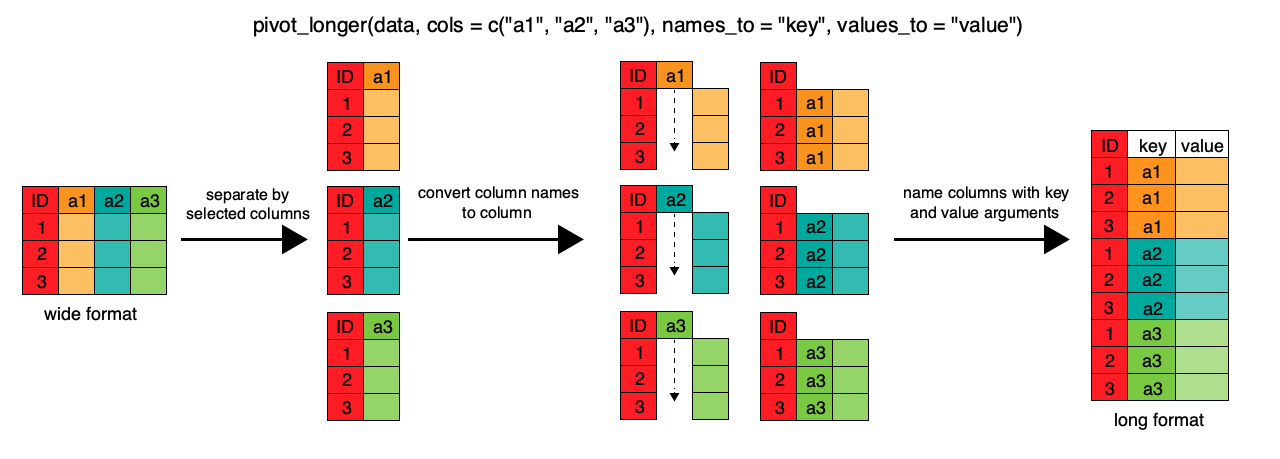
To change this very wide data frame layout back to our nice, intermediate (or longer) layout, we will use one of the two available pivot functions from the tidyr package. To convert from wide to a longer format, we will use the pivot_longer() function. pivot_longer() makes datasets longer by increasing the number of rows and decreasing the number of columns, or ‘lengthening’ your observation variables into a single variable.
gap_long <- gap_wide %>%
  pivot_longer(
    cols = c(starts_with('pop'), starts_with('lifeExp'), starts_with('gdpPercap')),
    names_to = "obstype_year", values_to = "obs_values"
  )
head(gap_long)| continent | country | obstype_year | obs_values |
|---|---|---|---|
| Africa | Algeria | pop_1952 | 9279525 |
| Africa | Algeria | pop_1957 | 10270856 |
| Africa | Algeria | pop_1962 | 11000948 |
| Africa | Algeria | pop_1967 | 12760499 |
| Africa | Algeria | pop_1972 | 14760787 |
| Africa | Algeria | pop_1977 | 17152804 |
Here we have used piping (%>%) syntax which is part of dplyr Package, we will see more tomorow at dplyr lesson too.
We first provide to pivot_longer() a vector of column names that will be pivoted into longer format. We could type out all the observation variables, but as in the select() function (see dplyr lesson if needed), we can use the starts_with() argument to select all variables that start with the desired character string. pivot_longer() also allows the alternative syntax of using the - symbol to identify which variables are not to be pivoted (i.e. ID variables).
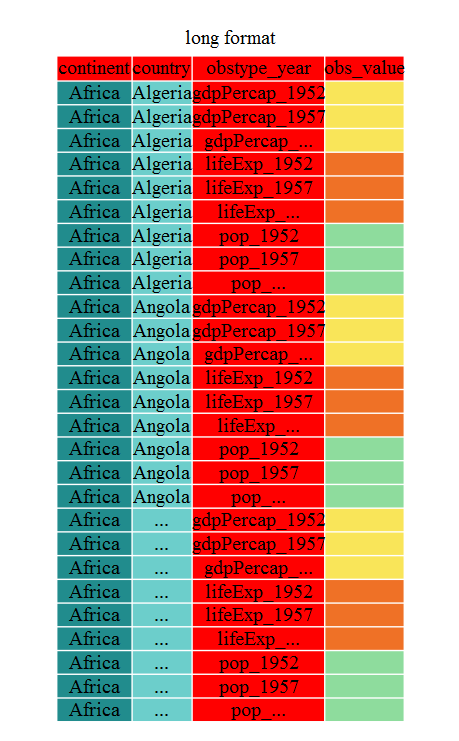
The next arguments to pivot_longer() are names_to for naming the column that will contain the new ID variable (obstype_year) and values_to for naming the new amalgamated observation variable (obs_value). We supply these new column names as strings.
 Apply the
 pivot_longer() and print the first few lines with head()
gap_long <- gap_wide %>%
  pivot_longer(
    cols = c(-continent, -country),
    names_to = "obstype_year", values_to = "obs_values"
  )

head(gap_long)| continent | country | obstype_year | obs_values |
|---|---|---|---|
| Africa | Algeria | gdpPercap_1952 | 2449.008 |
| Africa | Algeria | gdpPercap_1957 | 3013.976 |
| Africa | Algeria | gdpPercap_1962 | 2550.817 |
| Africa | Algeria | gdpPercap_1967 | 3246.992 |
| Africa | Algeria | gdpPercap_1972 | 4182.664 |
| Africa | Algeria | gdpPercap_1977 | 4910.417 |
Check the last couple of lines with tail()
tail(gap_long)| continent | country | obstype_year | obs_values |
|---|---|---|---|
| Oceania | New Zealand | pop_1982 | 3210650 |
| Oceania | New Zealand | pop_1987 | 3317166 |
| Oceania | New Zealand | pop_1992 | 3437674 |
| Oceania | New Zealand | pop_1997 | 3676187 |
| Oceania | New Zealand | pop_2002 | 3908037 |
| Oceania | New Zealand | pop_2007 | 4115771 |
That may seem trivial with this particular data frame, but sometimes you have 1 ID variable and 40 observation variables with irregular variable names. The flexibility is a huge time saver!
seperate()Now obstype_year actually contains 2 pieces of information, the observation type (pop,lifeExp, or gdpPercap) and the year. We can use the separate() function to split the character strings into multiple variables
gap_long <- gap_long %>%
  separate(obstype_year, into = c('obs_type', 'year'), sep = "_")

gap_long$year <- as.integer(gap_long$year)pivot_wider()It is always good to check work. So, let’s use the second pivot function, pivot_wider(), to ‘widen’ our observation variables back out. pivot_wider() is the opposite of pivot_longer(), making a dataset wider by increasing the number of columns and decreasing the number of rows. We can use pivot_wider() to pivot or reshape our gap_long to the original intermediate format or the widest format. Let’s start with the intermediate format.
The pivot_wider() function takes names_from and values_from arguments.
To names_from we supply the column name whose contents will be pivoted into new output columns in the widened data frame. The corresponding values will be added from the column named in the values_from argument.
gap_normal <- gap_long %>%
  pivot_wider(names_from = obs_type, values_from = obs_values)
dim(gap_normal)
[1] 1704 6dim(gapminder)[1] 1704 6names(gap_normal)[1] "continent" "country" "year" "gdpPercap" "lifeExp" "pop" names(gapminder)[1] "country" "year" "pop" "continent" "lifeExp" "gdpPercap"Now we’ve got an intermediate data frame gap_normal with the same dimensions as the original gapminder, but the order of the variables is different. Let’s fix that before checking if they are all.equal().
gap_normal <- gap_normal[, names(gapminder)]
all.equal(gap_normal, gapminder)
[1] "Attributes: < Component \"class\": Lengths (3, 1) differ (string compare on first 1) >"
[2] "Attributes: < Component \"class\": 1 string mismatch >"
[3] "Component \"country\": 1704 string mismatches"
[4] "Component \"pop\": Mean relative difference: 1.634504"
[5] "Component \"continent\": 1212 string mismatches"
[6] "Component \"lifeExp\": Mean relative difference: 0.203822"
[7] "Component \"gdpPercap\": Mean relative difference: 1.162302" head(gap_normal)| country | year | pop | continent | lifeExp | gdpPercap |
|---|---|---|---|---|---|
| Algeria | 1952 | 9279525 | Africa | 43.077 | 2449.008 |
| Algeria | 1957 | 10270856 | Africa | 45.685 | 3013.976 |
| Algeria | 1962 | 11000948 | Africa | 48.303 | 2550.817 |
| Algeria | 1967 | 12760499 | Africa | 51.407 | 3246.992 |
| Algeria | 1972 | 14760787 | Africa | 54.518 | 4182.664 |
| Algeria | 1977 | 17152804 | Africa | 58.014 | 4910.417 |
head(gapminder)| country | year | pop | continent | lifeExp | gdpPercap |
|---|---|---|---|---|---|
| Afghanistan | 1952 | 8425333 | Asia | 28.801 | 779.4453 |
| Afghanistan | 1957 | 9240934 | Asia | 30.332 | 820.8530 |
| Afghanistan | 1962 | 10267083 | Asia | 31.997 | 853.1007 |
| Afghanistan | 1967 | 11537966 | Asia | 34.020 | 836.1971 |
| Afghanistan | 1972 | 13079460 | Asia | 36.088 | 739.9811 |
| Afghanistan | 1977 | 14880372 | Asia | 38.438 | 786.1134 |
We’re almost there, the original was sorted by country, then year.
all.equal(gap_normal, gapminder)[1] "Attributes: < Component \"class\": Lengths (3, 1) differ (string compare on first 1) >"
[2] "Attributes: < Component \"class\": 1 string mismatch >"
[3] "Component \"country\": 1704 string mismatches"
[4] "Component \"pop\": Mean relative difference: 1.634504"
[5] "Component \"continent\": 1212 string mismatches"
[6] "Component \"lifeExp\": Mean relative difference: 0.203822"
[7] "Component \"gdpPercap\": Mean relative difference: 1.162302" That’s great! We’ve gone from the longest format back to the intermediate and we didn’t introduce any errors in our code.
unite()Now let’s convert the long all the way back to the wide. In the wide format, we will keep country and continent as ID variables and pivot the observations across the 3 metrics (pop,lifeExp,gdpPercap) and time (year). First we need to create appropriate labels for all our new variables (time*metric combinations) and we also need to unify our ID variables to simplify the process of defining gap_wide.
gap_temp <- gap_long %>% unite(var_ID, continent, country, sep = "_")
str(gap_temp)
tibble [5,112 × 4] (S3: tbl_df/tbl/data.frame)
$ var_ID : chr [1:5112] "Africa_Algeria" "Africa_Algeria" "Africa_Algeria" "Africa_Algeria" ...
$ obs_type : chr [1:5112] "gdpPercap" "gdpPercap" "gdpPercap" "gdpPercap" ...
$ year : int [1:5112] 1952 1957 1962 1967 1972 1977 1982 1987 1992 1997 ...
$ obs_values: num [1:5112] 2449 3014 2551 3247 4183 ...gap_temp <- gap_long %>%
unite(ID_var, continent, country, sep = "_") %>%
unite(var_names, obs_type, year, sep = "_")
str(gap_temp)tibble [5,112 × 3] (S3: tbl_df/tbl/data.frame)
$ ID_var : chr [1:5112] "Africa_Algeria" "Africa_Algeria" "Africa_Algeria" "Africa_Algeria" ...
$ var_names : chr [1:5112] "gdpPercap_1952" "gdpPercap_1957" "gdpPercap_1962" "gdpPercap_1967" ...
$ obs_values: num [1:5112] 2449 3014 2551 3247 4183 ...Using unite() we now have a single ID variable which is a combination of continent,country,and we have defined variable names. We’re now ready to pipe in pivot_wider()
gap_wide_new <- gap_long %>%
  unite(ID_var, continent, country, sep = "_") %>%
  unite(var_names, obs_type, year, sep = "_") %>%
  pivot_wider(names_from = var_names, values_from = obs_values)
head(gap_wide_new)| ID_var | gdpPercap_1952 | gdpPercap_1957 | gdpPercap_1962 | gdpPercap_1967 | gdpPercap_1972 | gdpPercap_1977 | gdpPercap_1982 | gdpPercap_1987 | gdpPercap_1992 | gdpPercap_1997 | gdpPercap_2002 | gdpPercap_2007 | lifeExp_1952 | lifeExp_1957 | lifeExp_1962 | lifeExp_1967 | lifeExp_1972 | lifeExp_1977 | lifeExp_1982 | lifeExp_1987 | lifeExp_1992 | lifeExp_1997 | lifeExp_2002 | lifeExp_2007 | pop_1952 | pop_1957 | pop_1962 | pop_1967 | pop_1972 | pop_1977 | pop_1982 | pop_1987 | pop_1992 | pop_1997 | pop_2002 | pop_2007 |
|---|---|---|---|---|---|---|---|---|---|---|---|---|---|---|---|---|---|---|---|---|---|---|---|---|---|---|---|---|---|---|---|---|---|---|---|---|
| Africa_Algeria | 2449.0082 | 3013.9760 | 2550.8169 | 3246.9918 | 4182.6638 | 4910.4168 | 5745.1602 | 5681.3585 | 5023.2166 | 4797.2951 | 5288.0404 | 6223.3675 | 43.077 | 45.685 | 48.303 | 51.407 | 54.518 | 58.014 | 61.368 | 65.799 | 67.744 | 69.152 | 70.994 | 72.301 | 9279525 | 10270856 | 11000948 | 12760499 | 14760787 | 17152804 | 20033753 | 23254956 | 26298373 | 29072015 | 31287142 | 33333216 |
| Africa_Angola | 3520.6103 | 3827.9405 | 4269.2767 | 5522.7764 | 5473.2880 | 3008.6474 | 2756.9537 | 2430.2083 | 2627.8457 | 2277.1409 | 2773.2873 | 4797.2313 | 30.015 | 31.999 | 34.000 | 35.985 | 37.928 | 39.483 | 39.942 | 39.906 | 40.647 | 40.963 | 41.003 | 42.731 | 4232095 | 4561361 | 4826015 | 5247469 | 5894858 | 6162675 | 7016384 | 7874230 | 8735988 | 9875024 | 10866106 | 12420476 |
| Africa_Benin | 1062.7522 | 959.6011 | 949.4991 | 1035.8314 | 1085.7969 | 1029.1613 | 1277.8976 | 1225.8560 | 1191.2077 | 1232.9753 | 1372.8779 | 1441.2849 | 38.223 | 40.358 | 42.618 | 44.885 | 47.014 | 49.190 | 50.904 | 52.337 | 53.919 | 54.777 | 54.406 | 56.728 | 1738315 | 1925173 | 2151895 | 2427334 | 2761407 | 3168267 | 3641603 | 4243788 | 4981671 | 6066080 | 7026113 | 8078314 |
| Africa_Botswana | 851.2411 | 918.2325 | 983.6540 | 1214.7093 | 2263.6111 | 3214.8578 | 4551.1421 | 6205.8839 | 7954.1116 | 8647.1423 | 11003.6051 | 12569.8518 | 47.622 | 49.618 | 51.520 | 53.298 | 56.024 | 59.319 | 61.484 | 63.622 | 62.745 | 52.556 | 46.634 | 50.728 | 442308 | 474639 | 512764 | 553541 | 619351 | 781472 | 970347 | 1151184 | 1342614 | 1536536 | 1630347 | 1639131 |
| Africa_Burkina Faso | 543.2552 | 617.1835 | 722.5120 | 794.8266 | 854.7360 | 743.3870 | 807.1986 | 912.0631 | 931.7528 | 946.2950 | 1037.6452 | 1217.0330 | 31.975 | 34.906 | 37.814 | 40.697 | 43.591 | 46.137 | 48.122 | 49.557 | 50.260 | 50.324 | 50.650 | 52.295 | 4469979 | 4713416 | 4919632 | 5127935 | 5433886 | 5889574 | 6634596 | 7586551 | 8878303 | 10352843 | 12251209 | 14326203 |
| Africa_Burundi | 339.2965 | 379.5646 | 355.2032 | 412.9775 | 464.0995 | 556.1033 | 559.6032 | 621.8188 | 631.6999 | 463.1151 | 446.4035 | 430.0707 | 39.031 | 40.533 | 42.045 | 43.548 | 44.057 | 45.910 | 47.471 | 48.211 | 44.736 | 45.326 | 47.360 | 49.580 | 2445618 | 2667518 | 2961915 | 3330989 | 3529983 | 3834415 | 4580410 | 5126023 | 5809236 | 6121610 | 7021078 | 8390505 |
gap_ludicrously_wide format data by pivoting over countries, year and the 3 metrics?
This new data frame should only have 5 rows.
gap_ludicrously_wide <- gap_long %>%
   unite(var_names, obs_type, year, country, sep = "_") %>%
   pivot_wider(names_from = var_names, values_from = obs_values)
Now we have a great ‘wide’ format data frame, but the ID_var could be more usable, let’s separate it into 2 variables with separate()
gap_wide_betterID <- separate(gap_wide_new, ID_var, c("continent", "country"), sep="_")
gap_wide_betterID <- gap_long %>%
    unite(ID_var, continent, country, sep = "_") %>%
    unite(var_names, obs_type, year, sep = "_") %>%
    pivot_wider(names_from = var_names, values_from = obs_values) %>%
    separate(ID_var, c("continent","country"), sep = "_")
str(gap_wide_betterID)
tibble [142 × 38] (S3: tbl_df/tbl/data.frame)
$ continent : chr [1:142] "Africa" "Africa" "Africa" "Africa" ...
$ country : chr [1:142] "Algeria" "Angola" "Benin" "Botswana" ...
$ gdpPercap_1952: num [1:142] 2449 3521 1063 851 543 ...
$ gdpPercap_1957: num [1:142] 3014 3828 960 918 617 ...
$ gdpPercap_1962: num [1:142] 2551 4269 949 984 723 ...
$ gdpPercap_1967: num [1:142] 3247 5523 1036 1215 795 ...
$ gdpPercap_1972: num [1:142] 4183 5473 1086 2264 855 ...
$ gdpPercap_1977: num [1:142] 4910 3009 1029 3215 743 ...
$ gdpPercap_1982: num [1:142] 5745 2757 1278 4551 807 ...
$ gdpPercap_1987: num [1:142] 5681 2430 1226 6206 912 ...
$ gdpPercap_1992: num [1:142] 5023 2628 1191 7954 932 ...
$ gdpPercap_1997: num [1:142] 4797 2277 1233 8647 946 ...
$ gdpPercap_2002: num [1:142] 5288 2773 1373 11004 1038 ...
$ gdpPercap_2007: num [1:142] 6223 4797 1441 12570 1217 ...
$ lifeExp_1952 : num [1:142] 43.1 30 38.2 47.6 32 ...
$ lifeExp_1957 : num [1:142] 45.7 32 40.4 49.6 34.9 ...
$ lifeExp_1962 : num [1:142] 48.3 34 42.6 51.5 37.8 ...
$ lifeExp_1967 : num [1:142] 51.4 36 44.9 53.3 40.7 ...
$ lifeExp_1972 : num [1:142] 54.5 37.9 47 56 43.6 ...
$ lifeExp_1977 : num [1:142] 58 39.5 49.2 59.3 46.1 ...
$ lifeExp_1982 : num [1:142] 61.4 39.9 50.9 61.5 48.1 ...
$ lifeExp_1987 : num [1:142] 65.8 39.9 52.3 63.6 49.6 ...
$ lifeExp_1992 : num [1:142] 67.7 40.6 53.9 62.7 50.3 ...
$ lifeExp_1997 : num [1:142] 69.2 41 54.8 52.6 50.3 ...
$ lifeExp_2002 : num [1:142] 71 41 54.4 46.6 50.6 ...
$ lifeExp_2007 : num [1:142] 72.3 42.7 56.7 50.7 52.3 ...
$ pop_1952 : num [1:142] 9279525 4232095 1738315 442308 4469979 ...
$ pop_1957 : num [1:142] 10270856 4561361 1925173 474639 4713416 ...
$ pop_1962 : num [1:142] 11000948 4826015 2151895 512764 4919632 ...
$ pop_1967 : num [1:142] 12760499 5247469 2427334 553541 5127935 ...
$ pop_1972 : num [1:142] 14760787 5894858 2761407 619351 5433886 ...
$ pop_1977 : num [1:142] 17152804 6162675 3168267 781472 5889574 ...
$ pop_1982 : num [1:142] 20033753 7016384 3641603 970347 6634596 ...
$ pop_1987 : num [1:142] 23254956 7874230 4243788 1151184 7586551 ...
$ pop_1992 : num [1:142] 26298373 8735988 4981671 1342614 8878303 ...
$ pop_1997 : num [1:142] 29072015 9875024 6066080 1536536 10352843 ...
$ pop_2002 : num [1:142] 31287142 10866106 7026113 1630347 12251209 ...
$ pop_2007 : num [1:142] 33333216 12420476 8078314 1639131 14326203 ...all.equal(gap_wide, gap_wide_betterID)[1] "Attributes: < Component \"class\": Lengths (1, 3) differ (string compare on first 1) >"
[2] "Attributes: < Component \"class\": 1 string mismatch >" There and back again!
tidyr package to change the layout of data frames.pivot_longer() to go from wide to longer layout.pivot_wider() to go from long to wider layout.sessionInfo()END